
Subscription
All paid non-contract pricing plans, such as Professional, operate on a subscription basis. The payment is charged once per calendar month according to the pricing plan's rate.
To activate the subscription, you need to have at least one payment method (credit card) added. If you don't have any payment methods added, a method will be automatically added during the first payment. This method will then be used for subsequent payments.
First Payment and VAT for Companies
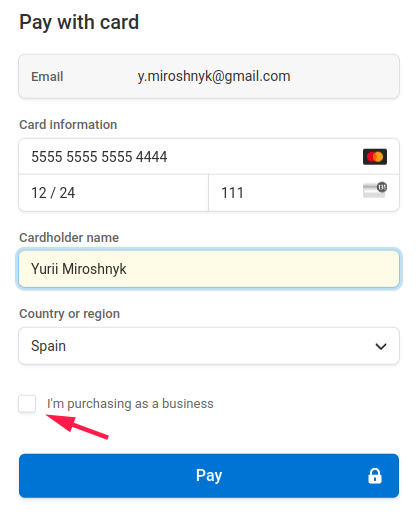
If you haven't added a payment method (credit card) before, during the first payment, you will need to enter your card details and indicate whether you are a business client:
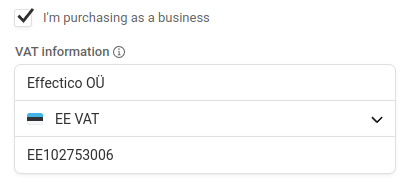
If you indicate that you are a business client, you will need to fill in the company details, including its name and VAT number. This will allow you to avoid paying VAT as much as possible.
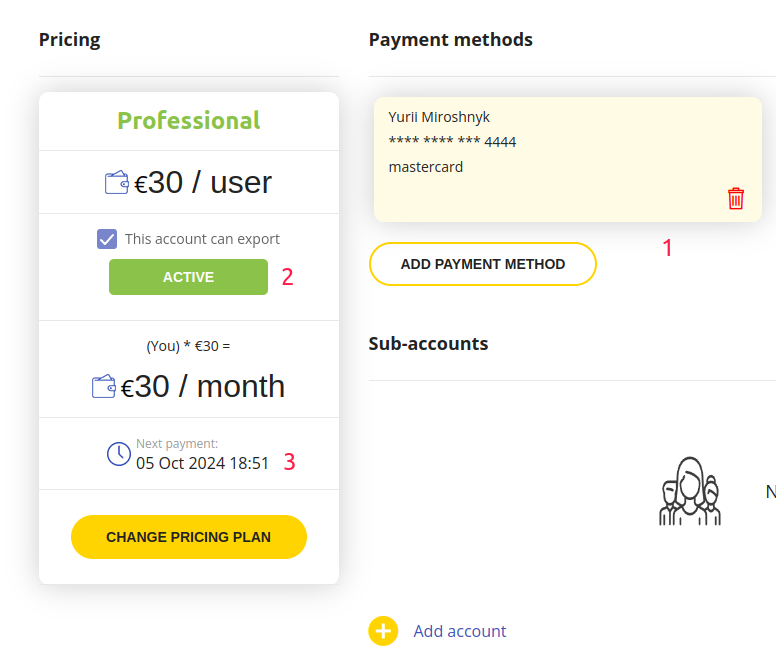
After the payment, you will be redirected back to the Profile page, where you will see the new payment method (1), the active export status for your account (2) (if you kept the checkbox checked), and the date of the next payment (3):
Subsequent Subscription Payments
If you have a payment method (credit card) added, subsequent payments will be made automatically once per calendar month using this payment method. If there are issues with payment, the system will make three additional attempts, one per day, after which it will deactivate the subscription and, with it, the ability to export effects. In case of such payment failures, you will receive an informative email notification.
Stopping the Subscription
To stop the subscription, you need to delete all available payment methods (credit cards). The subscription will remain active until the end of the current period.